Finding the Serial Number and Model Code of your Samsung TV
On the back of your Samsung television you can find a silver sticker. On that sticker is all the information about your TV when it comes to serial number, model code etc. However if your TV is wall mounted, it can be tricky to access the sticker on the back that has the information on it. If your TV powers on and you can access the settings menu, follow the steps below on how to find the serial number and model code in the settings menu on your TV.
 Please Note: The information on this page is for Australian products only. Models, sequences or settings will vary depending on location and/or where the product had been purchased. To be redirected to your local support page please click here.
Please Note: If your TV has been serviced, particularly if it has had the main board replaced, the serial number information may be missing in the settings menu. You'll need to find the sticker on the back of the TV to find the serial number information.
If your TV is not mounted, you can locate your TV's model and serial number on a sticker at the back of the unit. See the image below as an example.

For a step-by-step guide, follow the instructions below to access your TV's Model Code and Serial Number.
 Settings and then All Settings.
Note: Images were taken on a 2025 TV. Steps and sequences may vary depending on the model of your TV.
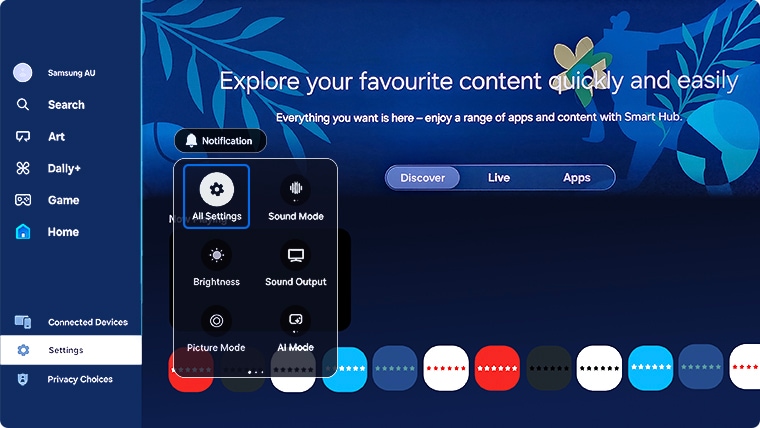


Steps by model year:
- 2023 - 2026 Model TVs: Settings > All Settings > Support > About the TV
- 2022 Model TVs: Menu > Settings > All Settings > Support > About this TV
- 2017 - 2021 Model TVs: Settings > Support > About this TV
- 2016 Model TVs: Settings > Support > Contact Samsung
- 2013 - 2015 Model TVs: Menu > Support > Contact Samsung

 This product should be mounted to a wall or other suitable surface to avoid serious injury. Find out more here.
Thank you for your feedback!
Please answer all questions.
Contact Info
Contact us
WhatsApp
![]()
![]()

