What do the different indicator icons mean on your Galaxy phone?
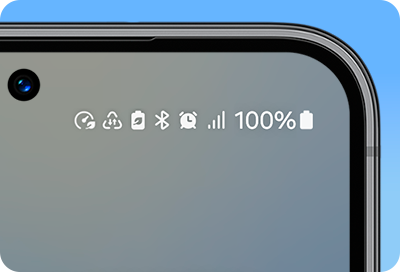
The icons displayed at the top of the screen provide information about the current status of your Galaxy phone. Refer to the icons listed in the table below to see what each symbol represents when using your Galaxy phone.
Note:
- The indicator bar may not appear at the top of the screen in some apps. To display the status bar, drag down from the top of the screen.
- Some indicator icons only appear when you open the notification panel.
- Indicator icons may appear differently depending on the network operator, model, or software version.
Network icons


Roaming (outside the normal service area)


GPRS network connected


EDGE network connected


3G network connected


HSDPA network connected


HSPA+ network connected


4G network connected


LTE network connected


LTE network connected to LTE network that includes 5G network


System notifications


An error has occurred or caution is required


Battery charging


Battery level


VPN service connected


Mobile Hotspot activated (Mobile data sharing)


Cast screen


Battery charging - One UI 7


Power saving mode enabled - One UI 7


Pending Notification - One UI 7 (The dot is removed when you open the notification panel)


Performance profile enabled - One UI 7
Other indicator icons appear in the status bar


Location activated.


Call in progress.


Missed call.


Text message.


Alarm activated.


Silent mode activated.


Vibration mode activated.


Airplane mode activated.


S Pen connected.


S Pen disconnected.
Other quick panel icons


Note: Keep in mind that some icons are part of third-party apps or features from previous versions.
- This FAQ covers Galaxy system icons, not icons related to specific apps.
- The indicator icons will vary depending on your phone model and version.
Check out information about how to change themes, icons, and color pallletes


Service Centers


Locate the nearest Samsung service center to have your product checked.

Thank you for your feedback!
Please answer all questions.
Contact Info
WhatsApp
![WhatsApp]()
![WhatsApp]()


Monday to Sunday
8:00 a.m. a 12:00 a.m.
LiveChat
![LiveChat]()
![LiveChat]()


Monday to Sunday
8:00 a.m. a 12:00 a.m.