Check out the information codes on my oven
In most cases, the displayed information codes are not a malfunction and can be cleared with a reset. Check the codes and instructions below and try the suggestions. However, some information codes need additional steps to be cleared. If any codes keep appearing on the screen, contact a Samsung service centre for further support.
Script: What do the Error Codes on my Samsung Oven mean
1. Code C-d0: Button Problem
- Clean buttons with a damp cloth
- Make sure no water is on or around the buttons
- Turn the oven off, then try again
2. Code S-01: Safety Shutoff
- This error usually displays when the oven has been at a set temperature for an extended period of time
- Under 105ºC: 16 hours
- From 105ºC to 240ºC: 8 hours
- From 245ºC to max: 4 hours
3. Codes dC or dE: Divider Check
- Ensure the divider is in place for dual cook mode and removed for single cook mode
- Turn the oven off, then restart
- If the problem persists, switch the power off for 30 seconds
4. Code C-d1; Door Lock Malfunction
- Turn the oven off, then restart
- If the problem continues, switch power off for 30 seconds
5. Codes C-20, C-21, C22: Sensor Malfunctions
- Turn the oven off, then restart
- If the problem continues, switch power off for 30 seconds
6. Code Pr E: Preheating
- The oven is preheating ― this is normal
- Keep the oven door closed until the code disappears
Frequently displayed information codes and solutions

|
Code |
Meaning |
Solutions |
|---|---|---|
|
C-d0 |
Button problem This displays when a button is pressed and held for a period of time. |
Clean the buttons and make sure there is no water on/around them. Turn off the oven and try again. |
|
S-01 |
Safety shutoff Oven has continued operating at a set temperature for an extended time period.
|
This is not a system failure. Turn off the oven and remove the food. Then try again normally. |
|
dC dE |
Divider check needed If the divider is removed during cooking in Dual cook mode. If the divider is inserted during cooking in Single cook mode. |
The divider must not be removed during cooking in Dual cook mode. Turn off the oven and then restart. If the problem continues, turn off the power for 30 seconds or more and then reconnect. |
|
C-d1 |
Door lock malfunctions |
Turn off the oven and then restart. If the problem continues, turn off the power for 30 seconds or more and then reconnect. |
|
C-20 C-21 C-22 |
Sensor malfunctions |
Turn off the oven and then restart. If the problem continues, turn off the power for 30 seconds or more and then reconnect. |
Note:
- If you find an information code that is not listed on this page, please find a manual with the specific model number.
- It may have a different design and information code depending on the model.
- If you are unable to clear any code from your oven, please contact the Samsung service centre for further support.
Additional information codes
|
Code |
Meaning |
Solutions |
|---|---|---|
|
C-F1 |
Only occurs during EEPROM Read/Write. |
Turn off the oven and then restart. If the problem continues, turn off the power for 30 seconds or more and then reconnect. |
|
C-F0 |
If there is no communication between the main PCB and sub PCB. |
Turn off the oven and then restart. If the problem continues, turn off the power for 30 seconds or more and then reconnect. |
|
C-F2 |
Occurs when a communication problem is maintained between the Touch IC and Main or Sub micom. |
Turn off the oven and then restart. If the problem continues, turn off the power for 30 seconds or more and then reconnect. |
|
Pr E |
This code means the oven is preheating. |
Pr E will display until the temperature is reached at the setting temperature. When the temperature reaches at the desired temperature, Pr E will disappear. While preheating, please keep the door closed. |
Note:
- If you find an information code that is not listed on this page, please find a manual with the specific model number.
- It may have a different design and information code depending on the model.
- If you are unable to clear any code from your oven, please contact the Samsung service centre for further support.
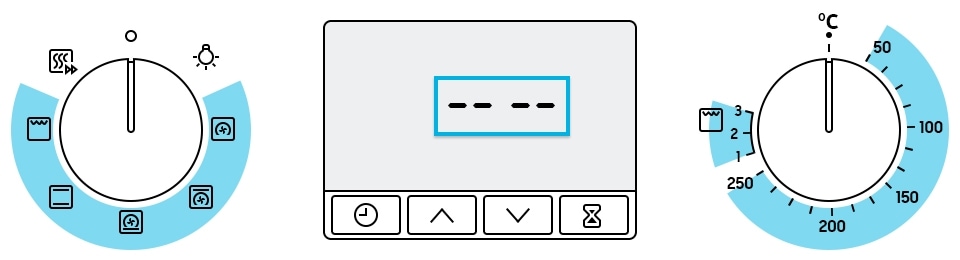
This code appears when you select the Grill function and set the temperature between 50°C and 250°C, or if you select Normal Cooking mode and set the temperature between Grill 1 and 3, you are asked to reset the temperature with a message and a beep.
Note:
- It may have a different design and information code depending on the model.
- If you are unable to clear any code from your oven, please contact the Samsung service centre for further support.
Thank you for your feedback!
Please answer all questions.