Bring your health into focus with a connected view of activity, vitals, sleep, mindfulness and nutrition. Understand your body better with clear insights and personalised guidance that help build healthier habits — keeping you informed and in tune with your everyday wellness.

See the Highlights

Activity

See your progress clearly, anytime

Activity levels are easier to understand when you keep track of your performance with Samsung Health. Monitor your progress, identify areas that need more attention and stay motivated as you move forward each day toward a healthier lifestyle.
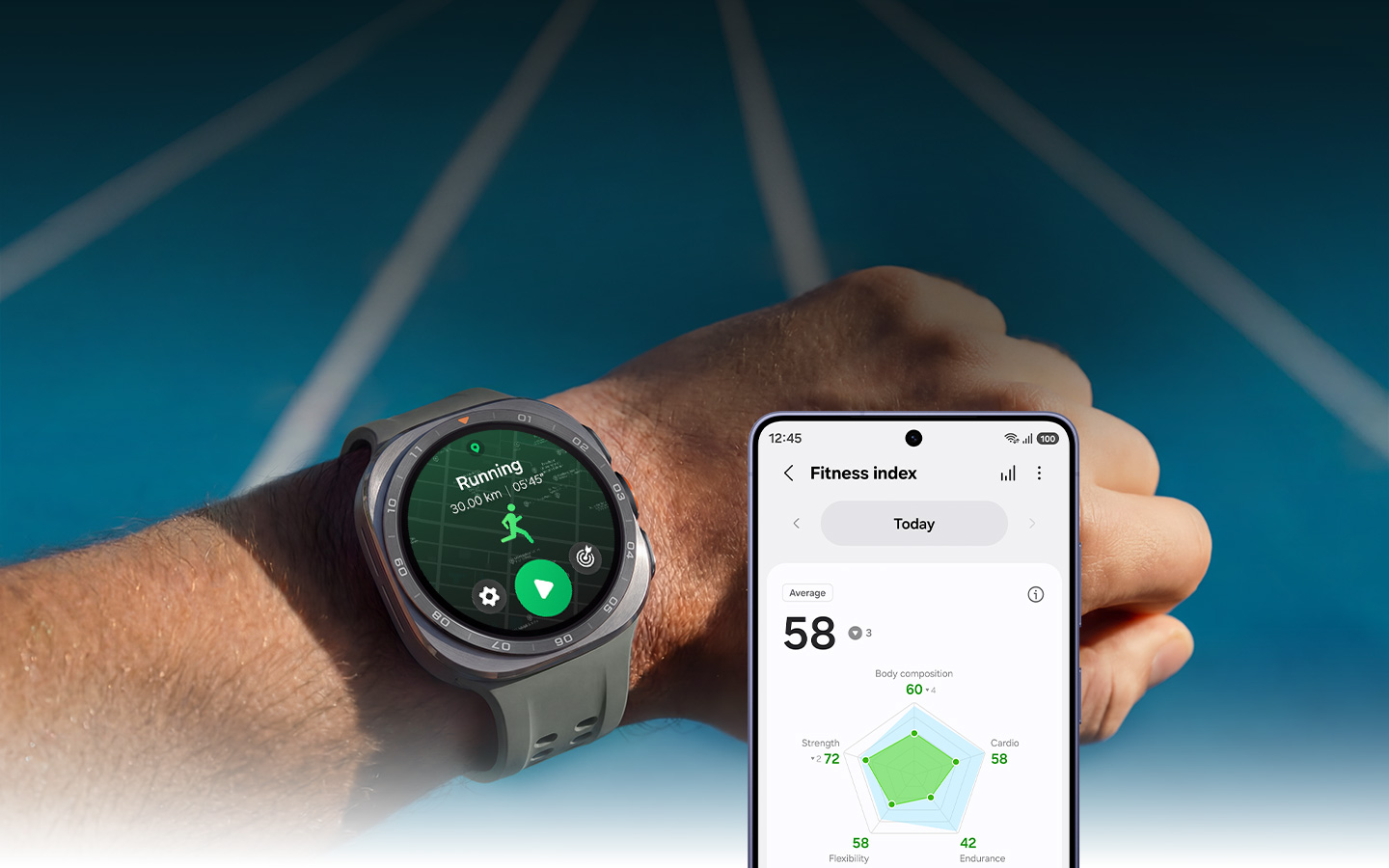
Try now A wrist with Galaxy Watch Ultra2 held up in the bright sunlight. The Running feature is onscreen. Galaxy S26 displaying the Fitness Index feature is next to Galaxy Watch Ultra2, showing today's average fitness score, which is 58.

Fitness Index

Know your fitness level. Own your progress

Fitness Index

Know your fitness level. Own your progress

Fitness Index keeps you motivated by showing you where you stand. Get a fitness score that reflects your overall performance based on 5 key metrics — VO2Max, BIA, heart rate, steps and activity data. Fitness Index also recommends content tailored to your goals and physical capabilities, encouraging you to take the next step and move forward on your path to fitness.1
Trail Run

Off-grid. On track

Trail Run

Off-grid. On track

Run at your own pace with guidance from Trail run. Mountain trail runs are unpredictable by nature — the path turns without warning and climbs are harder to pace. Trail run keeps you informed about hills, descents, remaining distance and more. Upload a GPX file and follow the route with real-time directions that help you stay on track and adjust your effort as the terrain changes.2
Daily Cardio Load

Train. Recover. Track both

Daily Cardio Load

Train. Recover. Track both

Daily Cardio Load gives you a clear view of your current strain and recovery. Daily Cardio Load tracks daily training load, including workouts and activities that reach heart rate Zone 3 or higher. Based on this data, Daily Cardio Load provides simple guidance on whether to push harder or take a rest, allowing you to train with more confidence each day. Achieve a better balance between training and recovery, and set higher goals as your fitness improves.3
Running Coach

Personal training, on the run

Running Coach

Personal training, on the run

Running Coach provides a personalised training program to help you run more effectively. Running Coach helps evaluate your running capacity and creates a tailored training plan based on your exercise data. Follow guided workouts to improve your technique, build stamina and boost performance. Gain the confidence to set new personal bests and keep leveling up.4, 5
Cycling

Ride smart. Carry less

Cycling

Ride smart. Carry less

'Cycling lets you train smarter and unlock your full performance potential. Import a GPX route to your Galaxy Watch Ultra2 and connect a power meter to your Galaxy Watch Ultra2 or smartphone to measure your Functional Threshold Power (FTP). With personalised performance insights and progress tracking, you can ride more efficiently, improve endurance and push toward new cycling goals with greater control.6, 7, 8
Swimming

Track your strokes for faster swimming records

Swimming

Track your strokes for faster swimming records

Turn every swim into an opportunity to improve. Monitor stroke type, split times, pace, speed and more for a comprehensive view of your workout. Use detailed insights to refine your technique, see how you're improving and prepare for more challenging swims.9
Others

Work out on your own terms

Others

Work out on your own terms

Keep moving toward your fitness goals with confidence. Choose from over 100 exercises to create a Routine Workout tailored to your needs and earn badges as you reach new milestones. Explore fitness content in the Fitness tab for inspiration. Plus, your Galaxy Watch or Ring can automatically track select workouts, helping you focus on moving without having to press start.10

How to run with Running Coach

Whether you're a beginner or an experienced runner, train at your own pace with Running Coach. Complete the survey and take the 12-minute running test to get assigned to a level. Based on the result, you'll receive personalized training that matches your running capacity. 9

Galaxy Watch8 with Running Coach feature onscreen, displaying the running level with number 4 icon and text Level 4. Confetti is also onscreen to indicate the user has successfully completed the running level test. Galaxy Watch8 with Running Coach feature onscreen, displaying the running level with number 4 icon and text Level 4. Confetti is also onscreen to indicate the user has successfully completed the running level test.
Sleep

Tomorrow is built tonight

Learn why you feel tired even after a full night's sleep with detailed sleep tracking on Galaxy Watch or Ring. The sleep tracking features monitor your sleep patterns and provide personalised guidance so you can improve rest to wake up more refreshed each day. 11, 12, 13
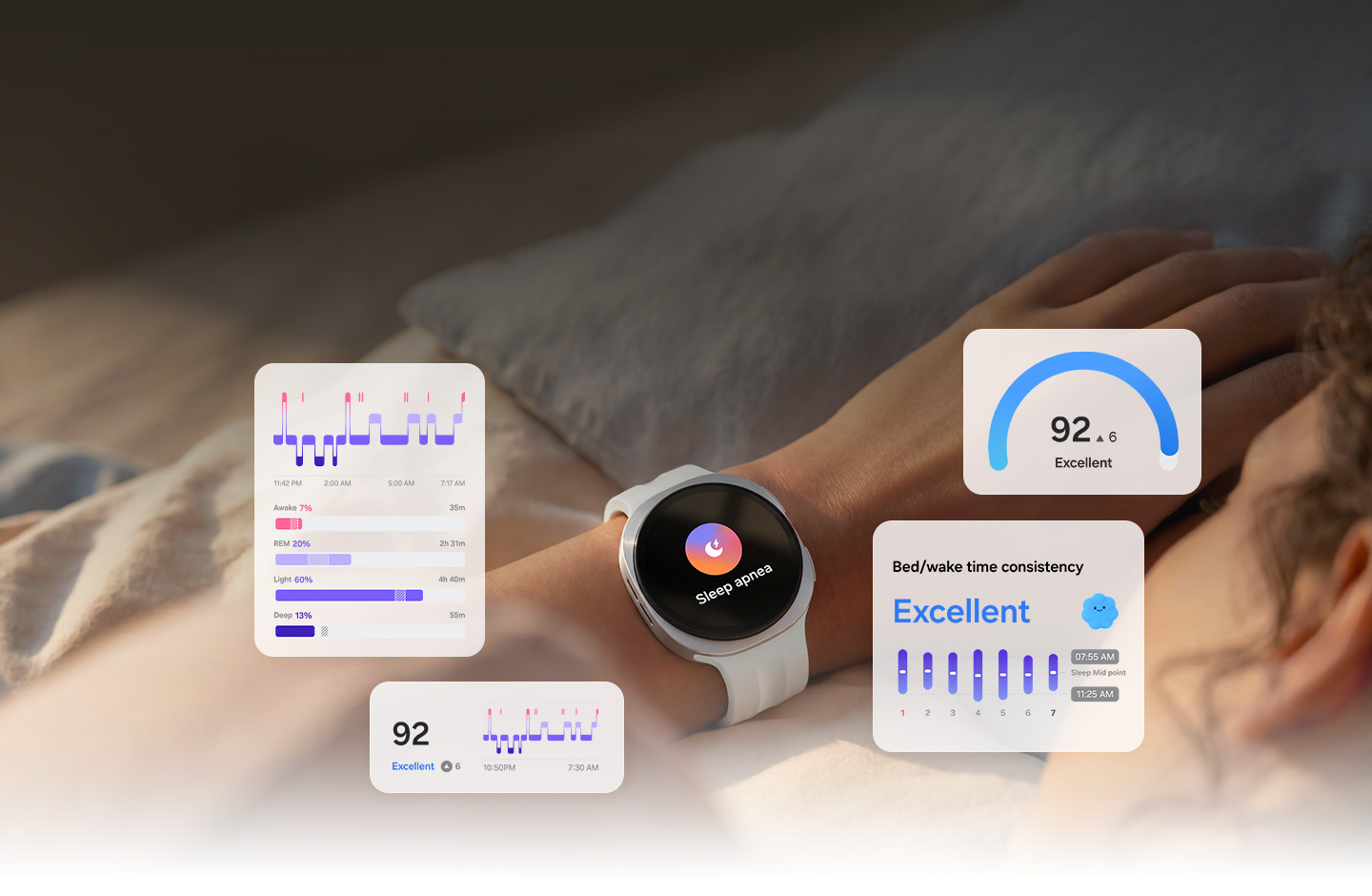
Try now A person is lying in bed with Galaxy Watch9 on the wrist. Sleep apnea risk detection feature logo is onscreen, indicating that the watch tracks repeated disruptions in breathing during sleep. Sleep tracking feature GUI are near Galaxy Watch9. Sleep stage data, Sleep time consistency and Energy Score can be seen.

Bedtime Guidance

Improve sleep quality with Bedtime Guidance

Bedtime Guidance

Improve sleep quality with Bedtime Guidance

Build a better sleep routine with personalized recommendations from Bedtime Guidance. Samsung Health helps analyse your sleep data to estimate how much rest you may need and suggest an optimal bedtime. By helping you maintain a consistent sleep schedule for better next-day alertness, Bedtime Guidance helps you wake up feeling more refreshed, energized and ready to start your day.14
Sleep Insight

Gather data for detailed sleep insight

Sleep Insight

Gather data for detailed sleep insight

Get better sleep by understanding your sleep patterns in detail. Track the time you spend in each sleep stage, along with your heart rate, movement and breathing using your Galaxy Watch or Ring. Receive detailed reports on sleep quality and patterns, plus a score that lets you assess your rest and make informed changes for better recovery.11
Sleep Coaching

Practice makes great mornings

Sleep Coaching

Practice makes great mornings

Sleep Coaching helps you improve sleep habits and improve the quality of your rest. Wear your Galaxy Watch or Ring while you sleep for a week to discover your sleep type, represented as an animal. Based on your sleep animal, Samsung Health provides a personalized Sleep Coaching program designed to guide you step by step. Follow your program to develop better routines and support deeper, more restorative rest.13, 15
Energy Score

Push or pause? Energy score tells you

Energy Score

Push or pause? Energy score tells you

Know your potential daily readiness and plan your day with ease. Based on your sleep and activity from the previous day, you receive your Energy Score each morning. If it’s lower than expected, view personalized tips on where to improve. Monitoring your Energy Score every day can help you make better choices for long-term well-being.16
Sleep Apnea

FDA-approved sleep apnea risk detection

Sleep Apnea

FDA-approved sleep apnea risk detection

Sleep deeper by monitoring your sleep quality overnight. With FDA-authorized sleep apnea risk detection, Galaxy Watch helps track oxygen saturation dips to identify possible signs of sleep apnea. In the morning, review detailed insights in the Samsung Health Monitor app to better interpret your sleep and take informed next steps.17

How to use Sleep Coaching

Improve your sleep quality by developing a better sleep routine with Sleep features. Discover your ideal bedtime with Bedtime Guidance to get enough rest for the next day. When enough sleep data has been accumulated, Sleep Coaching recommends a program tailored to your sleep pattern to help you build good sleep habits. 3, 5, 6

Front view of Galaxy Watch8 with Sleep feature notification onscreen. Sleep animal penguin icon is on the left. Text Sleep, number 92 and text Excellent. The same penguin is on the right side of Galaxy Watch8. Front view of Galaxy Watch8 with Sleep feature notification onscreen. Sleep animal penguin icon is on the left. Text Sleep, number 92 and text Excellent. The same penguin is on the right side of Galaxy Watch8.
Nutrition

Age well through better nutrition

Alongside regular exercise and quality sleep, a balanced diet plays an important role in healthy aging. Samsung Health lets you monitor and manage what you eat to support a more vibrant, active lifestyle.

Try now Paprika and avocado are in the background. In the middle, a hand is holding a smartphone with Food feature onscreen. Different metabolic health-related feature GUIs can be seen on each side, such as Antioxidant Index, AGEs index and Food Tracker.

Antioxidant Index

Check your Antioxidant Index with your thumb

Antioxidant Index

Check your Antioxidant Index with your thumb

See how your lifestyle may impact healthy aging with a simple skin-based measurement. Place your thumb on the sensor to measure carotenoids — antioxidants from fruits and vegetables — and receive an Antioxidant Index score from 0 to 100. Track your score over time and, if it's low, consider improving your diet to support healthier aging.18, 19, 20, 21
AGEs index

Understand metabolic health with AGEs index

AGEs index

Understand metabolic health with AGEs index

Promote healthy aging and metabolic wellness by managing your AGEs index. Advanced Glycation End-products (AGEs) can contribute to inflammation and long-term health risks. Track your AGEs index and follow a low-glycemic, balanced diet to help reduce buildup, support metabolic health and maintain long-term well-being.22
Food Tracker

Keep logs with Food Tracker for a balanced diet

Food Tracker

Keep logs with Food Tracker for a balanced diet

Build healthier eating habits with effortless meal tracking. Log your meals to monitor calorie and nutrient intake, and make more informed nutrition choices that support metabolic health. Use barcode scanning to instantly capture nutritional information and better understand how your daily diet impacts your health.23
Body Composition

Stay healthy with body composition analysis

Body Composition

Stay healthy with body composition analysis

Gain deeper insight into your health and make informed steps toward your goals. With Galaxy Watch, monitor weight, body fat and skeletal muscle using just your finger and check whether they’re within healthy ranges. Set personalised goals and receive motivational feedback to help you stay consistent and on track.10, 15, 24
Mindfulness

Practice mindfulness for sound body

Holistic wellness starts with balancing mind and body. Samsung Health helps you understand your mood and stress levels and unwind through guided breathing exercises and meditation. Check in daily to stay grounded and support your overall well-being.
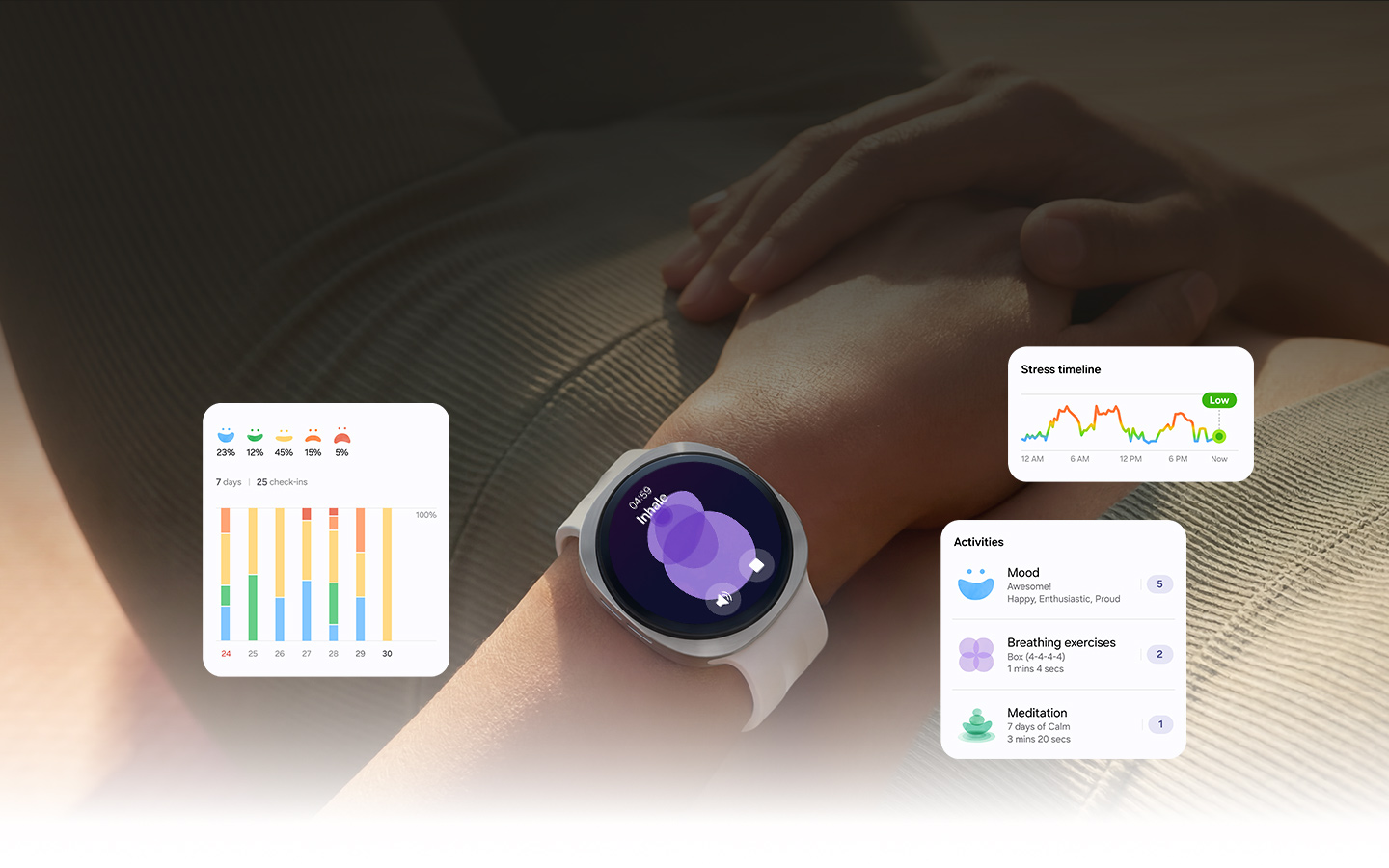
Try now A person lying on their back is wearing Galaxy Watch9 on their wrist. Stress feature is onscreen and the stress level is Low, indicating that the person is relaxed.

Mindfulness Tracker

Stay focused with Mindfulness Tracker

Mindfulness Tracker

Stay focused with Mindfulness Tracker

Feel more clear and balanced throughout your day. Log your mood and track changes in a simple dashboard to better understand your emotional patterns over time. Use Breathing exercises and Meditation to reduce stress, regain focus and make daily self-care a consistent part of your routine. 25
Stress

Monitor your stress and make progress

Stress

Monitor your stress and make progress

Take control of your mental well-being by understanding your daily stress patterns. Regularly track stress levels to see when you may feel overwhelmed or anxious. Use Breathing exercises to relieve tension, reset your mind and stay calm throughout the day, guiding you toward healthier responses to stress day by day.
Meditation

Seek peace and quiet through meditation

Meditation

Seek peace and quiet through meditation

Find emotional balance with guided relaxation designed for your day. Choose from a variety of Calm content — including Meditation, Sleep stories and Music — to reduce stress, restore focus and recharge your energy or wind down for restful sleep. Easily fit mindfulness into your routine, whether in the morning, during breaks or at night.
Vitals

A complete picture of your heart health

Galaxy Watch helps monitor heart activity around the clock. Then, Samsung Health Monitor combined with Samsung Health deliver meaningful insights into your well-being. Get practical guidance in keeping your heart in good condition effortlessly.15

Try now A woman is touching her Galaxy Watch. The watch displays an ECG reading of Sinus Rhythm, 20 seconds, and 65 bpm with a waveform graph, including the text 'app never looks for heart attack' at the bottom. A smartphone with ECG feature onscreen is shown nearby.

Heart Health

Your daily compass for heart health management

Heart Health

Your daily compass for heart health management

Designed to help understand your heart health, Heart Health Score gives you a view of your heart health and actionable steps to improve it. By tracking your patterns over a week or more, you receive a personalised score based on your average sleep, moderate-to-vigorous activity, BMI and vascular load. Use your Heart Health Score to identify key areas for improvement, establish healthier routines and receive tailored guidance on your next best steps.26
Vitals

Catches unusual vital signals before you feel it

Vitals

Catches unusual vital signals before you feel it

Vitals helps track key health metrics — heart rate, heart rate variability, blood oxygen, respiratory rate, and skin temperature — to detect subtle changes and show what they may signal about your health. This lets you see a clearer picture of your body whether during busy workdays or moments of rest. Take early, informed action before small changes become bigger concerns.27
Vascular Load

Cardiovascular tracking while you sleep

Vascular Load

Cardiovascular tracking while you sleep

Vascular Load helps you gain an insight into your circulatory health at a glance through an easy-to-read graph. Galaxy Watch measures your baseline during the first 3 nights of sleep, then provides ongoing trend reports. If levels remain high, you can adjust lifestyle habits — diet, exercise, sleep and stress — to better support your well-being.28, 29, 30
Blood Pressure

Track your blood pressure anywhere, anytime

Blood Pressure

Track your blood pressure anywhere, anytime

Take control of your heart health with blood pressure tracking. Quickly calibrate your Galaxy Watch and monitor significant changes in the Samsung Health Monitor app. Review blood pressure and pulse over time to get a clearer picture of your cardiovascular health, spot trends early and make more informed decisions.31, 32, 33, 34
Heart Rate

Keep a lookout on your heart rate

Heart Rate Heart Rate
Heart Rate

Keep a lookout on your heart rate

Stay informed on your heart health with continuous heart rate tracking designed to help you gain insights. Set your Galaxy Watch or Ring to record your heart rate while you sleep for restorative rest through the night. Review your data to understand overnight patterns, gain deeper insight into your recovery and make more informed decisions about your well-being.35
ECG/IHRN

Check for irregular heart rhythms with ECG

ECG/IHRN

Check for irregular heart rhythms with ECG

Monitor your heart condition with continuous heart rhythm monitoring that helps keep you informed of changes. Samsung Health helps track your heart rate and flag unusual patterns that may indicate irregularities such as atrial fibrillation (AFib). If detected, the Irregular Heart Rhythm Notification (IHRN) lets you know, and prompts an ECG for a deeper assessment of your heart rhythm.36, 37, 38

How to use Vascular Load

Monitor your heart health with Vascular Load. Establish the baseline by wearing your Galaxy Watch to sleep for 3 nights and compare it to your measurement to assess your current condition. Balance your diet, exercise regularly and get plenty of sleep to keep a steady vascular
load. 21, 22

Galaxy Watch8 Classic with Vascular Load onscreen. From the top, Labs icon, text Steady, bar graph, text Your vascular load is consistent. Galaxy Watch8 Classic with Vascular Load onscreen. From the top, Labs icon, text Steady, bar graph, text Your vascular load is consistent.

More Samsung Health features

Check out more features provided by Samsung Health that will support your healthcare journey.

Hearing

Keep your hearing health in check

Hearing

Keep your hearing health in check

Samsung Health helps monitor your daily sound exposure to protect your hearing. Hearing on Galaxy Watch tracks surrounding noise in real time and alerts you when levels exceed a set threshold. You’ll be able to understand your hearing health status on Samsung Health. Use actionable insights to understand patterns and take simple steps to support long-term hearing health.41, 42
Cycle Tracking

Understand every phase with Cycle Tracking

Cycle Tracking

Understand every phase with Cycle Tracking

Get a fuller picture of your cycle and plan your life with confidence. Monitor skin temperature changes during sleep as your Galaxy Watch or Ring tracks nightly readings. The Natural Cycles–adapted fertility algorithm helps analyze fluctuations to predict your next period and menstrual cycle, helping you better anticipate changes and plan your days around your body’s rhythm.43
Together

Motivate each other with Together

Together

Motivate each other with Together

Turn fitness into friendly competition with friends and global challenges. Add friends via contacts and create group challenges to hit step or distance goals together. Use the message board to chat, encourage each other and make workouts more engaging. Join monthly global challenges to compete with Samsung Health users worldwide and push your performance further.44
Weekly Report

Get a weekly report of your progress

Weekly Report

Get a weekly report of your progress

Track your health progress with clear, weekly insights that help you improve over time. The Weekly Report organizes your Energy Score, sleep, exercise, steps, food intake and body composition into a comprehensive overview. Compare results by week, month and year to see your progress, understand trends and make more informed decisions for your overall wellness.

Get the app

Download the Samsung Health app.

Add to your daily routine

Find the Galaxy device that fits your healthy lifestyle.

Health Partnerships

Samsung partners with companies and research institutions worldwide to provide health monitoring features, helping people gain detailed information on their overall well-being.
Your health data is stored safely with Samsung Knox
FAQ

  • Can I share my exercise logs?

    You can share your exercise logs by tapping the 'More options' menu on the top right side of Samsung Health page. Press 'Share', edit images and data, then save them to your phone or share it with your friends.
  • Samsung Health tracks the number of steps using the built-in acceleration sensor within your Samsung Galaxy device and Android smartphones (Android 10 or above) that detects movement, generating data to calculate your steps. It also measures your travelled distance based on your step count and stride length.
  • You can track your exercise on Samsung Health app or Samsung Galaxy Watch. Access the exercise tracking feature and select the workout. Press the start button to start recording. With Galaxy Ring, you can track walking, running and active workouts. Galaxy Fit3 can track walking, running, swimming, elliptical, rowing and active workouts. Galaxy Watch can track walking, running, outdoor cycling, swimming, elliptical, rowing and active workouts. Depending on the wearable device, the type of vital signs that are logged may be different.
  • You can use Running Coach by setting your goals and starting the program right away. Or you can start a 12-minute run to measure your running level first. Based on your running capabilities, you'll receive a step-by-step training program with Galaxy AI-powered insights to keep you moving forward.
  • Fitness Index provides a daily fitness score based on five key areas of fitness — body composition, cardio, strength, endurance and flexibility. Improving these areas consistently can help support overall physical balance and contribute to a higher score over time.
  • Yes, Daily Cardio Load provides recovery recommendations to help balance training and rest, reducing the risk of injury from overtraining or not recovering enough. It helps guide your target cardio load and recovery time to support a safer training plan and keep you ready for your next run.
  • Trail run can help provide on-course navigation along with key workout metrics such as total distance, estimated duration and total ascent/descent. During your workout, V2 lets you view detailed information in real time, helping you see when the next uphill section is coming or how much farther you have to go before reaching your destination.
  • Sleep tracking feature on Samsung Health app is available on supported wearable devices and smartphones. If you are not using a wearable device, you can check your estimated sleep time on your smartphone after you wake up and log that time as your sleep time. However, in order to measure vital signs other than sleep time, you need to connect supported wearable devices such as Galaxy Watch or Ring to Samsung Health app.
  • Sleep Coaching is a feature that provides a tailored sleep coaching program based on your sleep data. Wear your Galaxy Watch or Ring for at least 7 days while you sleep, including at least 1 workday and 1 day off. Once enough data has been gathered, you'll be assigned a sleep animal and the program will begin.
  • Energy Score is an index that can help show your current physical and mental readiness by analysing yesterday's physical activities and sleep patterns. Keep track of your Energy Score and to help develop better health and sleep habits to wake up ready to take on the day.
  • Open Samsung Health Monitor app on your paired smartphone and select Sleep apnea at the bottom of the screen. Tap the Sleep apnea toggle button to activate monitoring. Make sure your Samsung Galaxy Watch fits snugly on your wrist before going to bed. Overnight, it will look for signs of sleep apnea and let you know if there are any detections. Sleep apnea risk detection feature is supported on Galaxy Watch4 series and later released Samsung Galaxy Watch models (excluding Galaxy Fit) with Wear OS 5.0 or later, and supported on Android smartphones (Android 12 or above).
  • Bedtime Guidance calculates the amount of sleep needed based on the sleep time for the past 3 days and then on the 4th day, suggests the optimal bedtime based on the user's desired wake-up time.
  • AGEs (Advanced Glycation End-products) index is an indicator of biological age and is highly affected by dietary and lifestyle habits. Have the supported Galaxy Watch on while you sleep to help measure your AGEs index. You can see the comparison of your data and the average statistics of your age group. AGEs is a compound that is naturally created in the body when protein molecules and fat molecules oxidise because of sugar molecules. As you age, the more it accumulates in your system. Dietary and lifestyle habits can affect how fast AGEs pile up. For example, a diet that includes a lot of sugar can make AGEs build up faster. According to recent studies, high AGEs index can speed up aging and can cause chronic diseases.
  • Antioxidants help prevent chronic diseases by removing free radicals and reducing oxidative stress. There are two types of antioxidants: antioxidant enzymes synthesized in the body and antioxidant materials obtained from food. When the body's natural antioxidant enzymes become insufficient due to increased oxidative stress and aging, dietary antioxidants are required. Dietary antioxidants such as polyphenols, carotenoids, retinol, vitamin C and vitamin E are abundant in fruits and vegetables. Therefore, it is crucial to consume enough fruits and vegetables to manage oxidative stress caused by aging or unhealthy lifestyles.
  • The score system of Antioxidant Index is calculated based on WHO's recommendation of consuming 400 grams of vegetables and fruits a day: Very Low (Score < 50): Indicates average daily vegetable and fruit intake is below 50% of the recommended amount. Low (50 ≤ Score < 75): Indicates average daily vegetable and fruit intake ranges between 50% and 100% of the recommended amount. Adequate (75 ≤ Score): Indicates vegetable and fruit intake meets or exceeds the recommended amount.
  • Food Tracker helps record your food and beverage intake, analysing the macro- and micronutrient proportions of your diet. You can also check recommended nutrient ratios and adjust your diet accordingly.
  • On Galaxy Watch, Body Composition measures the ratio of 3 components that make up your body weight: water, fat and skeletal muscle. To track your body composition, simply place your fingers on the buttons of your Galaxy Watch. Once the measurement is complete, you'll see the results on the screen. You can also set goals for weight loss, skeletal muscle gain and body fat loss, with motivational messages to help you stay on track.
  • Mindfulness means being fully present in the moment and aware of your thoughts, feelings, body and surroundings without judgment. Practicing mindfulness can help reduce stress, improve focus and build greater self-awareness. Simple ways to practice include meditation, breathing exercises or taking a moment to notice your senses during everyday activities.
  • Getting enough quality sleep plays an important role in emotional well-being and mental performance. Good sleep can help you manage stress, think more clearly, make better decisions and support creativity. It also helps your mind process emotions and build resilience over time. On the other hand, poor sleep can lead to irritability, mood changes and difficulty concentrating, which may worsen existing mental health challenges.
  • Open Samsung Health Monitor app on your Samsung Galaxy Watch and select Blood pressure to start the measurement. For the initial blood pressure reading, you need a blood pressure cuff to calibrate your Galaxy Watch. Blood pressure cuff must be purchased separately.
  • You can monitor your estimated heart rate in real-time with Galaxy Watch, Ring or Fit which supports Samsung Health Monitor app. View your records and keep track of your readings.
  • You can take ECG tests with Galaxy Watch that supports Samsung Health Monitor app and to help check for possible signs of atrial fibrillation. In select countries or regions, you can receive alerts that can help notify you to take an ECG test when signs of irregular heart rhythm are detected while Galaxy Watch is on your wrist. ECG test feature is supported on Galaxy Watch4 series and later released Samsung Galaxy Watch models (excluding Galaxy Fit) with Wear OS 5.0 or later, and supported on Android smartphones (Android 12 or above). Availability may vary by country or region. Check out https://images.samsung.com/samsung-health/ifu/SaMD_available_countries.pdf for more information and latest update on service countries.
  • Vascular Load feature on Samsung Health shows the level of strain in your cardiovascular system. In order to use Vascular Load, you need to establish your baseline. The baseline is measured for 3 nights and is used to evaluate the trend of your vascular load. If your lifestyle changes significantly, you should update the baseline to keep it as accurate as possible. For example, if you reduce your salt intake or start exercising more, resetting the baseline will help your results reflect your current health status most accurately. The results are shown in five stages: higher, slightly higher, steady, slightly lower and lower. You’ll also receive helpful tips on maintaining cardiovascular health.
  • Samsung Health can help monitor key health metrics such as heart rate, heart rate variability, respiration rate, skin temperature and SpO₂ to help detect early signs of change in your body. By identifying potential issues before symptoms appear, it provides timely insights and guidance to help you take proactive steps toward staying healthy.
  • When your Heart Health Score is low, Samsung Health provides personalized guidance focused on habits that can have the biggest impact on cardiovascular health, including sleep, weight and exercise. With clear, practical recommendations tailored to your routine, it helps you make small everyday changes that can improve your score over time. Instead of broad or generic advice, Samsung Health offers actionable insights designed to help you build healthier habits and support better heart health long term.
  • Connecting accessories to Samsung Health is easy. To begin, open the Samsung Health app and tap 'More options'. Select 'Settings', tap 'Accessories' and verify that your device is ready to pair. A list of device categories will appear. Search then select your device. If your accessory is not listed, tap 'Scan for accessories'. Once your accessory appears in the menu, select it and follow the prompts to finish the setup process. Now, your device is registered and ready to record your fitness data.
  • Hearing Health on Samsung Health can help monitor your daily sound exposure by tracking both environmental noise and headphone audio levels to calculate a daily safe listening score. Galaxy Watch measures noise levels in real time and can send alerts when loud sounds are detected. In the Samsung Health mobile app, you can view trends in your noise exposure and get practical tips to help protect your hearing health.
  • Samsung Health is a comprehensive health and fitness platform, intended for general wellness purposes. It helps track your activity, sleep, diet and stress levels, and provides personalised insights to help you achieve your wellness goals.
  • Yes, Samsung Health app can be downloaded for free on the Google Play Store or Galaxy Store. You can download it on other Android smartphones from different manufacturers, such as Google phones. Samsung Health app requires Android OS version 10 or above. Availability of certain services may vary depending on the device model.
  • To help monitor advanced vital signs such as blood pressure, ECG and sleep apnea, you need to install Samsung Health Monitor app on your Samsung Galaxy smartphone. After pairing your Galaxy Watch with your Samsung Galaxy smartphone, access the Blood pressure, ECG or Sleep apnea feature on your Galaxy Watch. Your smartphone will start downloading Samsung Health Monitor app from Samsung Galaxy Store.
  • Can I share my exercise logs?

    You can share your exercise logs by tapping the 'More options' menu on the top right side of Samsung Health page. Press 'Share', edit images and data, then save them to your phone or share it with your friends.
  • Samsung Health tracks the number of steps using the built-in acceleration sensor within your Samsung Galaxy device and Android smartphones (Android 10 or above) that detects movement, generating data to calculate your steps. It also measures your travelled distance based on your step count and stride length.
  • You can track your exercise on Samsung Health app or Samsung Galaxy Watch. Access the exercise tracking feature and select the workout. Press the start button to start recording. With Galaxy Ring, you can track walking, running and active workouts. Galaxy Fit3 can track walking, running, swimming, elliptical, rowing and active workouts. Galaxy Watch can track walking, running, outdoor cycling, swimming, elliptical, rowing and active workouts. Depending on the wearable device, the type of vital signs that are logged may be different.
  • You can use Running Coach by setting your goals and starting the program right away. Or you can start a 12-minute run to measure your running level first. Based on your running capabilities, you'll receive a step-by-step training program with Galaxy AI-powered insights to keep you moving forward.
  • Fitness Index provides a daily fitness score based on five key areas of fitness — body composition, cardio, strength, endurance and flexibility. Improving these areas consistently can help support overall physical balance and contribute to a higher score over time.
  • Yes, Daily Cardio Load provides recovery recommendations to help balance training and rest, reducing the risk of injury from overtraining or not recovering enough. It helps guide your target cardio load and recovery time to support a safer training plan and keep you ready for your next run.
  • Trail run can help provide on-course navigation along with key workout metrics such as total distance, estimated duration and total ascent/descent. During your workout, V2 lets you view detailed information in real time, helping you see when the next uphill section is coming or how much farther you have to go before reaching your destination.
  • How does Samsung Health track my sleep automatically?

    Sleep tracking feature on Samsung Health app is available on supported wearable devices and smartphones. If you are not using a wearable device, you can check your estimated sleep time on your smartphone after you wake up and log that time as your sleep time. However, in order to measure vital signs other than sleep time, you need to connect supported wearable devices such as Galaxy Watch or Ring to Samsung Health app.
  • Sleep Coaching is a feature that provides a tailored sleep coaching program based on your sleep data. Wear your Galaxy Watch or Ring for at least 7 days while you sleep, including at least 1 workday and 1 day off. Once enough data has been gathered, you'll be assigned a sleep animal and the program will begin.
  • Energy Score is an index that can help show your current physical and mental readiness by analysing yesterday's physical activities and sleep patterns. Keep track of your Energy Score and to help develop better health and sleep habits to wake up ready to take on the day.
  • Open Samsung Health Monitor app on your paired smartphone and select Sleep apnea at the bottom of the screen. Tap the Sleep apnea toggle button to activate monitoring. Make sure your Samsung Galaxy Watch fits snugly on your wrist before going to bed. Overnight, it will look for signs of sleep apnea and let you know if there are any detections. Sleep apnea risk detection feature is supported on Galaxy Watch4 series and later released Samsung Galaxy Watch models (excluding Galaxy Fit) with Wear OS 5.0 or later, and supported on Android smartphones (Android 12 or above).
  • Bedtime Guidance calculates the amount of sleep needed based on the sleep time for the past 3 days and then on the 4th day, suggests the optimal bedtime based on the user's desired wake-up time.
  • What is AGEs index?

    AGEs (Advanced Glycation End-products) index is an indicator of biological age and is highly affected by dietary and lifestyle habits. Have the supported Galaxy Watch on while you sleep to help measure your AGEs index. You can see the comparison of your data and the average statistics of your age group. AGEs is a compound that is naturally created in the body when protein molecules and fat molecules oxidize because of sugar molecules. As you age, the more it accumulates in your system. Dietary and lifestyle habits can affect how fast AGEs pile up. For example, a diet that includes a lot of sugar can make AGEs build up faster. According to recent studies, high AGEs index can speed up aging and can cause chronic diseases.
  • Antioxidants help prevent chronic diseases by removing free radicals and reducing oxidative stress. There are two types of antioxidants: antioxidant enzymes synthesized in the body and antioxidant materials obtained from food. When the body's natural antioxidant enzymes become insufficient due to increased oxidative stress and aging, dietary antioxidants are required. Dietary antioxidants such as polyphenols, carotenoids, retinol, vitamin C and vitamin E are abundant in fruits and vegetables. Therefore, it is crucial to consume enough fruits and vegetables to manage oxidative stress caused by aging or unhealthy lifestyles.
  • The score system of Antioxidant Index is calculated based on WHO's recommendation of consuming 400 grams of vegetables and fruits a day: Very Low (Score < 50): Indicates average daily vegetable and fruit intake is below 50% of the recommended amount. Low (50 ≤ Score < 75): Indicates average daily vegetable and fruit intake ranges between 50% and 100% of the recommended amount. Adequate (75 ≤ Score): Indicates vegetable and fruit intake meets or exceeds the recommended amount.
  • Food Tracker helps record your food and beverage intake, analysing the macro- and micronutrient proportions of your diet. You can also check recommended nutrient ratios and adjust your diet accordingly.
  • On Galaxy Watch, Body Composition measures the ratio of 3 components that make up your body weight: water, fat and skeletal muscle. To track your body composition, simply place your fingers on the buttons of your Galaxy Watch. Once the measurement is complete, you'll see the results on the screen. You can also set goals for weight loss, skeletal muscle gain and body fat loss, with motivational messages to help you stay on track.
  • Why is mindfulness important and how do I take care of it?

    Mindfulness means being fully present in the moment and aware of your thoughts, feelings, body and surroundings without judgment. Practicing mindfulness can help reduce stress, improve focus and build greater self-awareness. Simple ways to practice include meditation, breathing exercises or taking a moment to notice your senses during everyday activities.
  • Getting enough quality sleep plays an important role in emotional well-being and mental performance. Good sleep can help you manage stress, think more clearly, make better decisions and support creativity. It also helps your mind process emotions and build resilience over time. On the other hand, poor sleep can lead to irritability, mood changes and difficulty concentrating, which may worsen existing mental health challenges.
  • How can I measure my blood pressure?

    Open Samsung Health Monitor app on your Samsung Galaxy Watch and select Blood pressure to start the measurement. For the initial blood pressure reading, you need a blood pressure cuff to calibrate your Galaxy Watch. Blood pressure cuff must be purchased separately.
  • You can monitor your estimated heart rate in real-time with Galaxy Watch, Ring or Fit which supports Samsung Health Monitor app. View your records and keep track of your readings.
  • You can take ECG tests with Galaxy Watch that supports Samsung Health Monitor app and to help check for possible signs of atrial fibrillation. In select countries or regions, you can receive alerts that can help notify you to take an ECG test when signs of irregular heart rhythm are detected while Galaxy Watch is on your wrist. ECG test feature is supported on Galaxy Watch4 series and later released Samsung Galaxy Watch models (excluding Galaxy Fit) with Wear OS 5.0 or later, and supported on Android smartphones (Android 12 or above). Availability may vary by country or region. Check out https://images.samsung.com/samsung-health/ifu/SaMD_available_countries.pdf for more information and latest update on service countries.
  • Vascular Load feature on Samsung Health shows the level of strain in your cardiovascular system. In order to use Vascular Load, you need to establish your baseline. The baseline is measured for 3 nights and is used to evaluate the trend of your vascular load. If your lifestyle changes significantly, you should update the baseline to keep it as accurate as possible. For example, if you reduce your salt intake or start exercising more, resetting the baseline will help your results reflect your current health status most accurately. The results are shown in five stages: higher, slightly higher, steady, slightly lower and lower. You’ll also receive helpful tips on maintaining cardiovascular health.
  • Samsung Health can help monitor key health metrics such as heart rate, heart rate variability, respiration rate, skin temperature and SpO₂ to help detect early signs of change in your body. By identifying potential issues before symptoms appear, it provides timely insights and guidance to help you take proactive steps toward staying healthy.
  • When your Heart Health Score is low, Samsung Health provides personalized guidance focused on habits that can have the biggest impact on cardiovascular health, including sleep, weight and exercise. With clear, practical recommendations tailored to your routine, it helps you make small everyday changes that can improve your score over time. Instead of broad or generic advice, Samsung Health offers actionable insights designed to help you build healthier habits and support better heart health long term.
  • How can I connect accessories to Samsung Health?

    Connecting accessories to Samsung Health is easy. To begin, open the Samsung Health app and tap 'More options'. Select 'Settings', tap 'Accessories' and verify that your device is ready to pair. A list of device categories will appear. Search then select your device. If your accessory is not listed, tap 'Scan for accessories'. Once your accessory appears in the menu, select it and follow the prompts to finish the setup process. Now, your device is registered and ready to record your fitness data.
  • Hearing Health on Samsung Health can help monitor your daily sound exposure by tracking both environmental noise and headphone audio levels to calculate a daily safe listening score. Galaxy Watch measures noise levels in real time and can send alerts when loud sounds are detected. In the Samsung Health mobile app, you can view trends in your noise exposure and get practical tips to help protect your hearing health.
  • Samsung Health is a comprehensive health and fitness platform, intended for general wellness purposes. It helps track your activity, sleep, diet and stress levels, and provides personalized insights to help you achieve your wellness goals.
  • Yes, Samsung Health app can be downloaded for free on the Google Play Store or Galaxy Store. You can download it on other Android smartphones from different manufacturers, such as Google phones. Samsung Health app requires Android OS version 10 or above. Availability of certain services may vary depending on the device model.
  • To help monitor advanced vital signs such as blood pressure, ECG and sleep apnea, you need to install Samsung Health Monitor app on your Samsung Galaxy smartphone. After pairing your Galaxy Watch with your Samsung Galaxy smartphone, access the Blood pressure, ECG or Sleep apnea feature on your Galaxy Watch. Your smartphone will start downloading Samsung Health Monitor app from Samsung Galaxy Store.

Instructions for Use: IFU

Find out more detailed information about supported
health-related features in your country.

  • * Check out https://images.samsung.com/samsung-health/ifu/SaMD_available_countries.pdf for more information about health-related features and the latest updates on supported service countries.
  • * Galaxy Watch8 must be paired with a smartphone with Android 12.0 or above and minimum 1.5 GB Memory.
  • 1. Fitness Index is available on Android phones (Android 10 or later) and requires the Samsung Health app (version 7.0 or later). Samsung account login is required. This service is only available on Galaxy Watch7 or above. To use the features, BIA and VO2Max each need to be measured at least once, along with 2 days of activity records and step count data.
  • 2. Trail run is available on Android phones (Android 13 or above) and requires the Samsung Health app (v7.0 or above). Samsung account login required. Service only available on Galaxy Watch Ultra2.
  • 3. Daily Cardio Load is available on Android phones (Android 11 or above) and requires the Samsung Health app (v7.0 or above). Samsung account login required. Service only available on Galaxy Watch7 or above. To use the feature, at least 7 days of activity records are required, while 28 days of continuous wear is recommended for optimal accuracy. Please note that values may increase in daily situations where heart rate rises, such as during tension, anxiety or stress.
  • 4. Sequences shortened and simulated. Results for illustrative purposes only.
  • 5. Running Coach program is available on Android phones (Android 10 or above) and requires Samsung Health app (v6.30.2 or above). Samsung account login required. Service only available with Galaxy Watch7 Series or later released Galaxy Watch Series. To use Running Coach program, user needs to take a running level test and get a level before starting the coach program.
  • 6. Provided when GPX format route file is imported for hiking and cycling and route is set as target under Samsung Health settings.
  • 7. To measure personalised FTP (Functional Threshold Power), Samsung Galaxy Watch Ultra2 must be connected to a power meter. The FTP is calculated automatically when cycling occurs at a mid to high intensity level for more than 4 minutes with the cycling power meter attached to your bicycle. Using machine learning, the more you ride repeatedly, the more accurate and personalised FTP values will be calculated. The cycling power meter is sold separately.
  • 8. Cycle accessory connection is available on the Samsung Health app (v7.0 or above) and is exclusively supported on Galaxy Watch Ultra2. Cycling feature supports connections for Power Meters, Speed Sensors and Cadence Sensors during Outdoor Bike, Indoor Bike and Mountain Biking exercises. Support for other accessories, such as Smart Trainers, is not available. Connection compatibility may vary for certain third-party or minor brand products.
  • 9. Water resistance of Galaxy Watch is different for each model. Refer to product page for details. In the case of Galaxy Watch9, it has a water resistance rating of 50 meters according to the ISO22810 standard. The test was conducted in fresh water. Galaxy Watch9 is also water resistant with an IPX8 rating based on the lab test conditions for submersion in up to 1.5 meters fresh water for up to 30 minutes. It is not suitable for high-pressure water activities and diving. It may be used for shallow-water activities like swimming in a pool or ocean. Water resistance is not a permanent condition and can diminish over time. Refer to the user manual for further information, including care/use instructions. Galaxy Watch9 has obtained MIL-STD-810H Certification: high/low temperature, altitude, humidity, immersion, salt fog, dust, vibration, drop, etc. MIL-STD-810H is a standardised form of testing designed by the U.S. Military to accurately assess device limitations. Real world usage may vary by specific environmental conditions used in the testing. Extreme conditions not guaranteed. Actual performance may vary depending on the environment where it is used. Watch availability may vary depending on country, region or carrier.
  • 10. Compatible smartphones and available features may vary by country/region, carrier or device.
  • 11. Sleep tracking features are intended for general wellness and fitness purposes only. Not intended for use in detection, diagnosis, treatment of any medical condition or sleep disorder. The measurements are for your personal reference only. Please consult a medical professional for advice.
  • 12. Sleep tracking requires wearing Galaxy Watch or Galaxy Ring to sleep.
  • 13. Available on Samsung Health app v.6.24 or above and must be paired with Samsung Galaxy smartphones with Android OS 10 and above. Samsung account login required. Requires sleep data of at least 7 days (including 1 workday and 1 day off).
  • 14. Bedtime Guidance is available on Android phone (Android 10 and above) and requires Samsung Health app (v6.30.2 or later). Bedtime Guidance based on 3 days of sleep analysis of user's circadian rhythm and sleep pressure. Intended for general wellness and fitness purposes only. The measurements are for your personal reference only. Not intended for use in detection, diagnosis, treatment of any medical condition or sleep disorder. Please consult a medical professional for advice.
  • 15. Energy Score is available on Android phones (Android 11 or above) and requires Samsung Health app (v6.27 or above). Samsung Account login required. Service availability may vary by country, region, language. To check the Energy Score, the health data tracked from Samsung Galaxy Watch must be synchronized with the Samsung Health app. Needs at least the previous day's activity data and sleep, and heart rate data during sleep. Not intended for use in detection, diagnosis, treatment of any medical condition. The result is for your personal reference only. Please consult a medical professional for advice.
  • 16. Requires a Galaxy smartphone running Android 12 or above. Do not use feature if you are pregnant or have previously been diagnosed with sleep apnea. 22 years+ only. Intended to detect signs of moderate to severe obstructive sleep apnea over a two-night period. Feature will not detect central sleep apnea. Does not replace diagnosis or treatment by a healthcare professional.
  • 17. Antioxidant Index available on Android phones (Android 10 or above) and requires the Samsung Health app (v6.30.2 or above). Samsung account login required.
  • 18. To measure, place the centre of your finger on the sensor at the back of the Watch and hold it for 5 seconds. While antioxidant index can be measured using any finger, the thumb is recommended for the most accurate result.
  • 19. Repeated measurement due to uneven skin texture may lead to different results.
  • 20. Antioxidant Index is for fitness and wellness only. Not intended for use in detection, diagnosis or treatment of any medical condition. Please consult a medical professional for advice if you're concerned about your antioxidant level. This is a Labs feature that you can preview before its official launch. If you don't want to use this experimental feature, you can turn it off in Samsung Health settings.
  • 21. Advanced Glycation End-products (AGEs) index requires Samsung Account login and Samsung Health app 6.27 or later. Available on devices with Android OS 10 (Q OS) or later. Requires wearing Galaxy Watch to sleep. Not intended for use in detection, diagnosis, treatment of any medical condition. AGEs index is for your personal reference only. Please consult a medical professional for advice.
  • 22. Barcode scanning on Food Tracker is available only in the United States, Germany, France, Italy, Poland, Russia and the Netherlands.
  • 23. Body composition is only supported in Samsung Galaxy Watch4 series and later released Galaxy Watch models. Body composition should not be used if you have an implanted pacemaker or other implanted medical devices, or if you are pregnant. Any health-related information accessed through the device and application should not be treated as medical advice. Measurement results may not be accurate if you are under 20 years old. The measurements are for your personal reference only. Please consult a medical professional for advice.
  • 24. Mindfulness available on Android phones (Android 10 or above) and requires the Samsung Health app (Samsung Health app for mobile phones v6.29 or above, Samsung Health app for Galaxy Watch v6.30 or above).Samsung account login required. Mindfulness is intended for general wellness purposes only. Not intended for use in detection, diagnosis, treatment of any medical condition. The tracking is for your personal reference only. Please consult a professional for advice.
  • 25. Heart Health is available on Android phones (Android 11 or above) and requires the Samsung Health app v7.0 or above. Samsung account login required. To calculate Heart Health, data on related lifestyle factors — including sleep time, BMI, vascular load and moderate to vigorous activity time — must be collected. It is required to wear Galaxy Watch (One UI 9 Watch or above). Heart Health is for fitness and wellness only. If you've been diagnosed with cardiovascular disease or are recovering from surgery, be sure to follow your healthcare professional's treatment plan.
  • 26. Vitals is available on Android phones (Android 13 or above) and requires the Samsung Health app v7.0 or above. Samsung account login required. Vitals requires at least 7 nights of sleep data, and wearing a Galaxy Watch or Galaxy Ring during sleep is necessary. Vitals is for wellness only, not for the diagnosis or treatment of any medical condition. If you're concerned about your health, be sure to see a medical professional.
  • 27. For accurate blood pressure readings, a calibration is required every 4 weeks by BP monitor & arm cuff. Requires a Galaxy smartphone running Android 12.0 or above.
  • 28. Availability of Blood Pressure app may vary by country or region. Due to country restrictions in obtaining approval/registration as a Software as a medical device (SaMD), Blood Pressure app only works on watches and smartphones purchased in the countries where service is currently available (however, service may be restricted when users travel to non-service countries). It is not intended for use by people under 22 years old.
  • 29. Users should measure their blood pressure when at rest, as they would do with a traditional cuff, and refrain from measuring when they are working out, smoking or drinking. Blood Pressure app is not intended for any diagnostic purposes regarding hypertension or other heart conditions or users under 22 years old. Users should not interpret or take clinical action based on the device output without consultation of a qualified healthcare professional. Blood Pressure app is not intended to replace traditional methods of diagnosis or treatment.
  • 30. Vascular Load available on Android phones (Android 10 or above) and requires the Samsung Health app (v6.30.2 or above). Samsung account login required. To measure vascular load, it is required to wear Galaxy Watch (Galaxy Watch Ultra, Watch8 and later released Galaxy Watch Series) when sleeping for at least 3 days out of recent 14 days.
  • 31. Vascular load monitoring is for fitness and wellness only. If you've been diagnosed with cardiovascular disease or are recovering from surgery, be sure to follow your doctor's treatment plan. This is a Labs feature that you can preview before its official launch. If you don't want to use this experimental feature, you can turn it off in Samsung Health settings.
  • 32. Measured blood pressure history can be reviewed within the Samsung Health Monitor app on a paired smartphone.
  • 33. HR alerts is intended for general wellness and fitness purposes only. Not intended for use in detection, diagnosis, treatment, monitoring or management of any medical condition or disease. Any health-related information accessed through the device and application should not be treated as medical advice. Users should seek any medical advice from a physician.
  • 34. Availability of Irregular Heart Rhythm Notification (IHRN) feature may vary by country/region. Due to country restrictions in obtaining approval/registration as a Software as a medical device (SaMD), it only works on watches and smartphones purchased in the countries where service is available (however, service may be restricted when users travel to non-service countries). Not intended to provide a notification on every episode of irregular rhythm suggestive of AFib and the absence of a notification is not intended to indicate no disease process is present. It is not for users with other known arrhythmias or users under 22 years old. Users should not interpret or take clinical action based on the predictions made without consultation of a qualified healthcare professional.
  • 35. IHRN feature is expected to become available in more countries/regions in the future, subject to the regulatory process of each country/region. Please refer to https://images.samsung.com/samsung-health/ifu/SaMD_available_countries.pdf for more information and latest update on service countries.
  • 36. Availability of ECG app may vary by country/region. Due to country restrictions in obtaining approval/registration as a Software as a medical device (SaMD), ECG app only works on watches and smartphones purchased in the countries where service is available (however, service may be restricted when users travel to non-service countries). Check out https://images.samsung.com/samsung-health/ifu/SaMD_available_countries.pdf for more information and latest update on service countries. It is not for users under 22 years old. Users should not interpret or take clinical action based on the device output without consulting qualified healthcare professional.
  • 37. Hearing is available on Android phones (Android 10 or later) and requires the Samsung Health app (version 7.0 or later). A Samsung account login is required.
  • 38. This service is only available with Galaxy Watch Ultra 2 and Galaxy Watch 9. Tracking sound levels is essential because it allows us to measure, monitor, and control noise objectively in ways that protect human health, ensure regulatory compliance, and improve safety and comfort in various environment. To use this feature, simply turn on Sound Monitoring in the Hearing settings.
  • 39. Cycle Tracking is available for cycle and period prediction which is powered by Natural Cycles. Cycle Tracking based on skin temperature works on phones and watches purchased in the countries where the service is currently available. NOT INTENDED FOR CONTRACEPTION. If you are currently taking hormonal birth control or undergoing hormonal treatment that inhibits ovulation, this service will not be useful for tracking ovulation. Predictions displayed are for personal reference only. To improve the accuracy of predictions, it is recommended to wear your Galaxy Ring or Galaxy Watch5 and above for at least 4 hours during sleep at night, 5 times a week. Predictions may vary depending on the proper use of your ring or watch, input data, environmental conditions, etc. Intended for users 18 years old and above. Users should not interpret or take clinical action based on the predictions made without consultation of a qualified healthcare professional.
  • 40. Together feature currently only supports walking and running.