How to use Diagnostics in the Samsung Members app on your Galaxy phone

How to Use Diagnostics in the Samsung Members App on Your Galaxy Phone
The Samsung Members app provides a built-in Diagnostics tool that helps identify hardware and software issues on your Galaxy phone. You can use it to run system tests, submit detailed error reports, and get support from Samsung experts.
1. What Is the Samsung Members App?
The Samsung Members app is a support platform designed for Galaxy users. It allows you to:
- Run diagnostics to check your device's performance and hardware functionality.
- Submit error reports for issues like slow performance, overheating, or system crashes.
- Access community forums and official support resources.
2. How to Update Your Galaxy Phone Before Using Diagnostics
Before running diagnostics, ensure your device has the latest software version. Outdated software can cause false positives in diagnostic results.
- Open Settings on your Galaxy phone.
- Scroll down and tap Software update.
- Select Download and install.
- Follow the on-screen instructions to complete the update.
3. How to Run Diagnostics Using the Samsung Members App
Follow these steps to test your device's hardware and software performance:
- Open the Samsung Members app from your home screen or app drawer.
- Tap on the menu icon (three horizontal lines) in the top-left corner.
- Select Diagnostics from the menu.
- Choose the type of test you want to run (e.g., battery, display, or camera).
- Follow the on-screen prompts to complete the test.
4. How to Submit an Error Report in the Samsung Members App
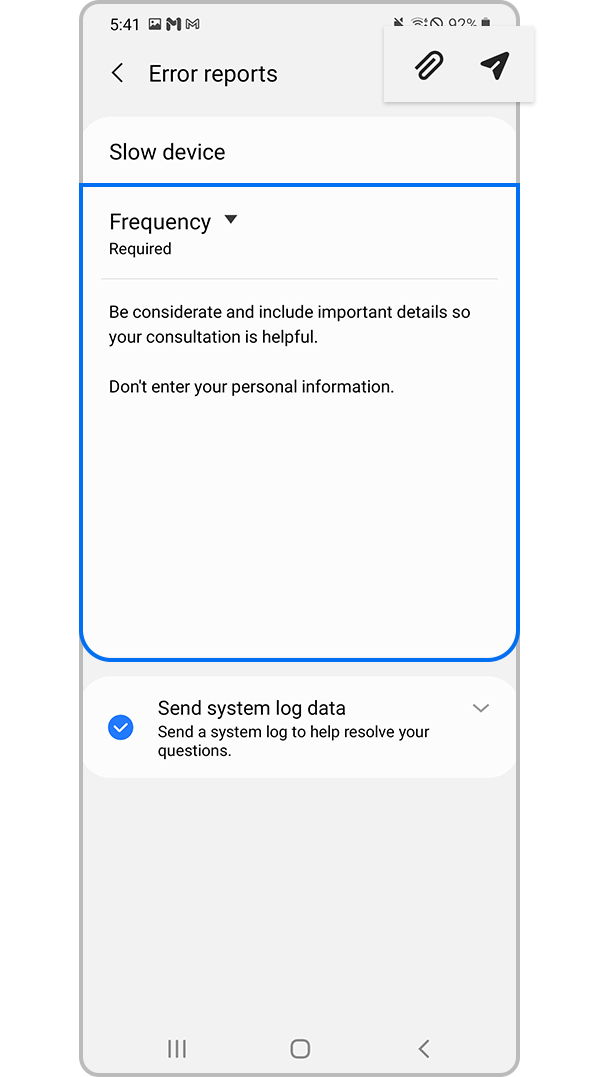
If your device is experiencing issues, you can submit an error report to Samsung for troubleshooting:
- Open the Samsung Members app.
- Tap on Get Help at the bottom of the screen.
- Select Send error report.
- Choose the issue category (e.g., slow device, overheating, or system settings).
- Provide additional details and tap Submit.
5. Supported Samsung Galaxy Devices
The Samsung Members app and its Diagnostics feature are compatible with most Galaxy devices, including:
- Galaxy S24, S25, and S26 series
- Galaxy Z Fold and Galaxy Z Flip series
- Galaxy A series (A14, A15, etc.)
6. Why Use the Samsung Members App for Diagnostics?
Diagnostics in the Samsung Members app offers several benefits:
- Accurate hardware and software testing without third-party tools.
- Direct integration with Samsung support for faster troubleshooting.
- Detailed error reports that help technicians identify issues quickly.
7. Additional Things to Check
If diagnostics don't resolve your issue, consider these steps:
- Clear cache files to improve performance.
- Restart your device to reset system processes.
- Check for app conflicts by booting into Safe Mode.
Related Samsung Support Topics



Thank you for your feedback!
Please answer all questions.