How do I properly use my Samsung Galaxy Buds2
Properly using your Samsung Galaxy Buds2 ensures the best audio performance, call clarity, and noise-canceling effectiveness. This guide covers correct earbud placement, cleaning techniques, and software updates to maintain peak functionality.
1. How do I wear my Samsung Galaxy Buds2 correctly?
To achieve the best fit and performance:
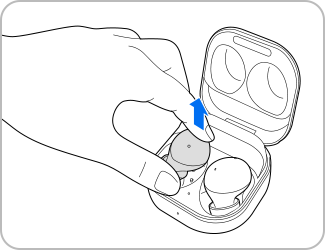
- Remove each earbud from the charging case by holding the upper and lower sides.
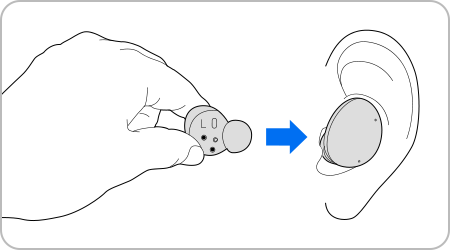
- Check the direction of each earbud using the imprinted marks.
- Insert the earbuds into your ears until they fit comfortably, ensuring the touch-sensitive sensors detect them. A sound will confirm detection.
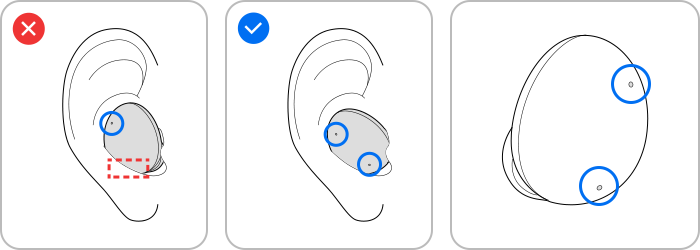
- Ensure all outer microphones are fully exposed. Covered microphones may impair voice recognition during calls or Bixby activation.
- Use the Galaxy Earbud Fit Test in the Galaxy Wearable app to verify proper fit. Improper positioning can affect call quality and feature functionality.
- Note: In restricted areas like airplanes or hospitals, follow posted warnings regarding wireless device usage.
2. Why is cleaning my Galaxy Buds2 important?
Regular cleaning prevents earwax buildup, maintains sound quality, and ensures microphone functionality.
- Clean the microphone holes, speakers, and air ducts with a soft, dry brush or cotton swabs. Detach ear tips before cleaning speakers.
- Wipe earbuds with a dry cloth after use. Avoid liquids and sharp objects to prevent damage.
- Clean charging contacts with a dry cloth if charging issues occur.
- Remove dust, sand, or metal shavings from the charging case and earbuds before use.
3. How do I update my Galaxy Buds2 software?
Keep your earbuds updated for the latest features and improvements:
- Open the Galaxy Wearable app on your phone.
- Tap Earbuds Settings > Earbuds Software Update.
- Select Update to install the latest firmware.
- Note: Menus may vary by device model and software version.
4. Supported Samsung Galaxy Devices
The Galaxy Buds2 are compatible with most Samsung Galaxy smartphones and tablets, including the Galaxy S24, Galaxy Z Fold, Galaxy Z Flip, and Galaxy A series.
5. Related Samsung Support Topics

Thank you for your feedback!
Please answer all questions.