How can I improve audio quality on my Samsung Galaxy Buds2
How to improve audio quality on Samsung Galaxy Buds2
Poor audio quality on your Samsung Galaxy Buds2 can result from improper fit, Bluetooth interference, dirt accumulation, or outdated software. Follow these steps to restore optimal sound performance.
1. Why is my Samsung Galaxy Buds2 audio quality poor?
Audio issues on the Galaxy Buds2 often stem from:
- Incorrect earbud fit leading to poor seal
- Interference from nearby devices or crowded areas
- Dirt or debris blocking the speaker mesh
- Outdated earbud software affecting performance
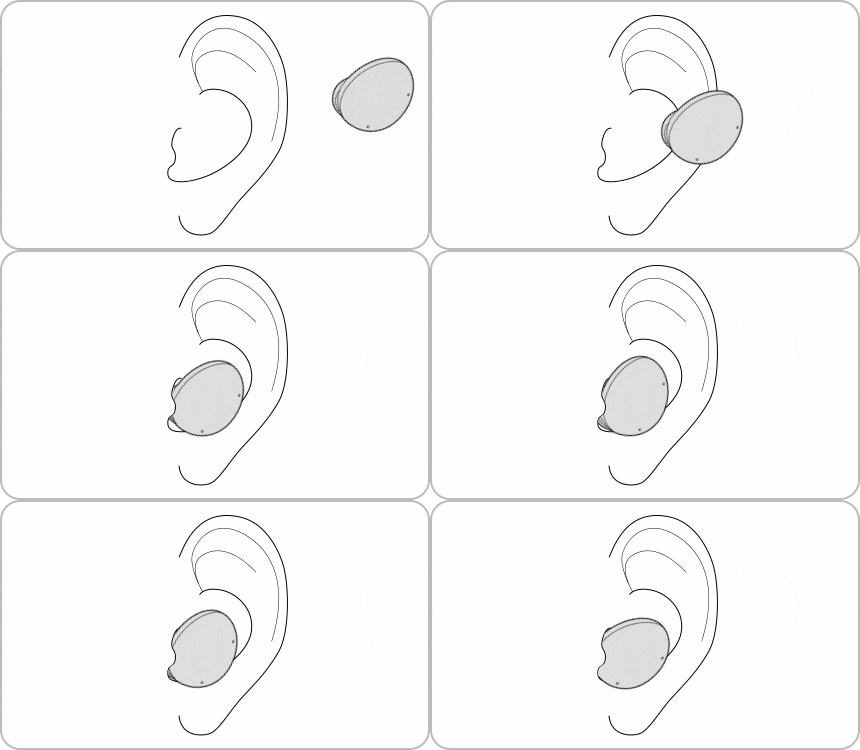
2. How do I ensure my Galaxy Buds2 fit properly?
- Check the L and R labels and insert each earbud into the correct ear.
- Adjust the earbuds until they fit securely and comfortably in your ears.
- Use the Galaxy Wearable app's fit test to confirm a proper seal.
Proper fit ensures better sound quality and active noise cancellation performance.
3. How can I reduce Bluetooth interference?
- Keep your phone and earbuds close together during use.
- Avoid crowded or high-interference areas such as public transport or offices.
- Reconnect Bluetooth by turning off and on the connection in your device settings.
Interference can degrade audio quality, so minimizing signal disruption is essential.
4. What should I do if the volume is too low?
- Increase the volume on your connected device.
- Adjust sound settings in the Galaxy Wearable app if available.
Low device volume can impact overall audio output, so ensure it's set appropriately.
5. How do I update my Galaxy Buds2 software?
- Open the Galaxy Wearable app on your device.
- Tap on Earbuds settings.
- Select Earbuds software update.
- Tap Update to install any available firmware.
Software updates improve performance and resolve known audio-related issues.
6. Additional things to check
- Clean the earbuds regularly to remove dirt or wax buildup.
- Ensure your connected device's Bluetooth settings are optimized.
- Test audio quality with different music or media sources.
7. Supported Samsung Galaxy devices
The Galaxy Buds2 is compatible with most Samsung Galaxy smartphones and tablets, including the Galaxy S24, Galaxy S25, Galaxy Z Fold, Galaxy Z Flip, and Galaxy A series devices.
8. When might updates not appear?
Software updates may not appear if:
- Your device is not connected to a stable internet connection.
- The Galaxy Wearable app is outdated.
- Your earbuds are already running the latest firmware version.
Related Samsung support topics

Thank you for your feedback!
Please answer all questions.