What is the Samsung Galaxy Ecosystem and how does it work

The Samsung Galaxy Ecosystem allows your Galaxy devices to work together seamlessly, enabling smooth transitions between tasks, data sharing, and continued activities across smartphones, tablets, and earbuds. This ecosystem enhances productivity and convenience by integrating devices through features like Auto Switch, App Continuity, and Keyboard Share.
1. What is the Samsung Galaxy Ecosystem?
The Samsung Galaxy Ecosystem connects your Galaxy devices—such as smartphones, tablets, and earbuds—to create a unified experience. With features like Auto Switch, App Continuity, and Keyboard Share, you can effortlessly transition tasks, share data, and continue activities across devices without interruptions.
2. How does the Galaxy Buds Auto Switch feature work?
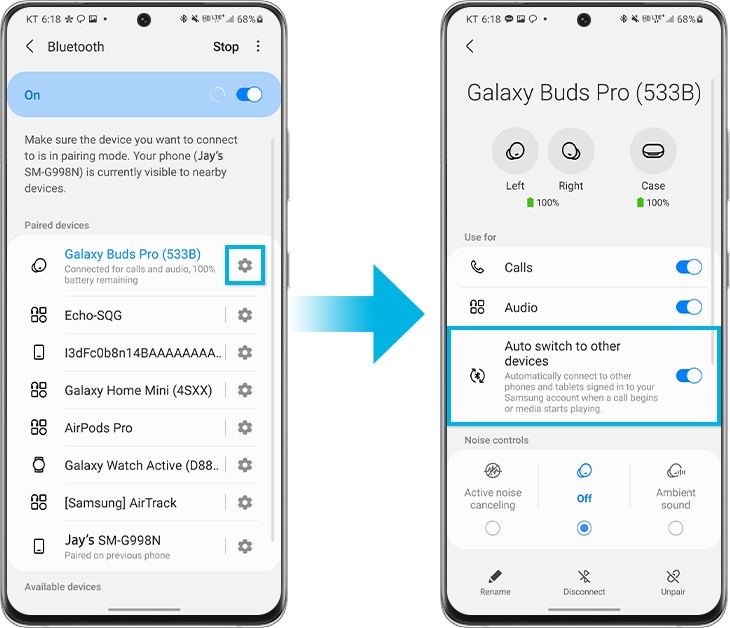
Auto Switch allows your Galaxy Buds to automatically switch between connected devices, ensuring a seamless audio experience. Follow these steps to enable Auto Switch:
- Open Settings on both devices.
- Tap Connections.
- Tap Bluetooth.
- Select your Galaxy Buds.
- Turn on Auto switch to other devices.
- Your devices must be signed in to the same Samsung account and stay nearby for Auto Switch to work effectively.
3. Why does App Continuity enhance the Galaxy Ecosystem?
App Continuity lets you switch between devices without restarting apps. For example, you can browse on your smartphone and continue on your tablet, or shop on your tablet and switch to your smartphone for payment. To enable App Continuity:
- Go to Settings > Advanced features.
- Tap Continue apps on other devices to switch on for both devices.
- This feature supports Samsung Notes and Samsung Internet apps on devices running One UI 3.1 or above.
4. How can I use the Tablet Keyboard Share feature?
Your tablet book cover keyboard can be shared between Galaxy smartphones and tablets. To register the keyboard:
- Press the 'Cmd' and 'Lang' keys simultaneously on the keyboard.
- Select the pop-up window for keyboard connection on your smartphone.
- Once connected, use the keyboard to type on your smartphone.
- This feature requires devices running One UI 3.1 or above and is supported on Tab S7, Tab S7+, and Tab S6.
5. Supported Samsung Galaxy devices
The Galaxy Ecosystem features are compatible with Galaxy smartphones, tablets, and earbuds running One UI 3.1 or above. Supported devices include Galaxy S24, Galaxy S25, Galaxy S26, Galaxy Z Fold, Galaxy Z Flip, and Galaxy A series.
6. Related Samsung support topics
Thank you for your feedback!
Please answer all questions.